When ever I create an Artificial Intelligence (AI) I find it tedious that I have to hard code everything into the AI, this is especially the case when created multiple variations of AI as it can lead to repetition. Because of this I decided to take my second game jam as an opportunity to experiment with modular AI. Even though this game just needs one type of AI I decided to see if by making the AI modular, it would be considered designer friendly allowing designer and other non-programmer team members to work on the AI with little help from me.
Looking into Game AI pro 3 on modular AI it talks about modules being used for a specific function and should not be similar to one another. The book event suggest sub modules for modules that cover one area of the AI such as movement but have many variety’s of that area such as walking and riding a bike or car and so on. In addition, it also states using modular decision making something more akin to behaviour tress (Rabin 2017).
Unfortunately due to time constraints my AI is a Finite State Machine and only has modular actions while the states that are needed to make the transaction to different actions will need to be hard coded. However, each action inherits from an action base class allowing for more actions to be easily made. I also intended to ensure that the AI will not break if it is missing an action, which could allow for different enemies using different behaviours. For example, an AI could just have the chasing action so that the AI will only chase the player when spotted.
When planning and prototyping the AI I decided to use paper prototyping as it is a cheap and easy way to create and design features. This is shown below in fig 1.

When creating the actions I decided to use Unity’s Scriptable objects (SO) as they are a great feature that lets you create programmable objects that can then be created like when a developer is creating a cube for the level.
When decided to use SO I was not entirely sure how to pass data to the AI or how to attach an array of SO to the AI component. Fortunately, a Unity presentation that focuses on SO was about to help me understand how to set it up, the presentation even had an example of modular AI. The presentation is called ‘Overthrowing the MonoBehaviour Tyranny in a Glorious Scriptable Object Revolution’ by Richard Fine.
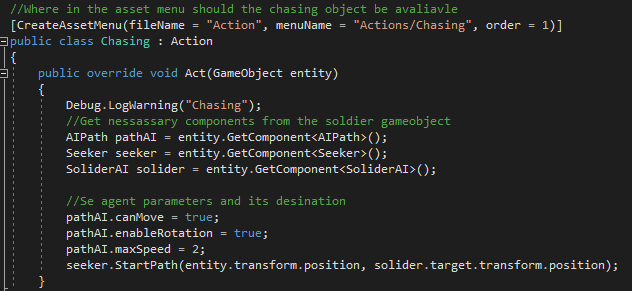
Though these are not actual GameObjects that can be placed or seen in a level they are objects containing data that you can drag and drop into custom components. SOs can be used to contain data for items, weapons and so on, but for me the SOs contain the necessary data and instruction for each action that the AIs will use. This makes it designer friendly because one can be created without having to create a new script and can then be dragged and dropped into the AI component. An example of the SOs action is shown in fig 3.
If I could do this again
If I were to do this again I would definitely look into creating SO states so that what triggers the actions can also be modular. In addition, one thing that wasn’t considered when designing the system was that the actions would be called every frame, which was fine for actions like Patrol, chase and Capture, however for the ‘looking’ action, since a random position was being made every frame I had to include a task system that ensured a new position wasn’t generated until it reached the current one.
Conclusion
Though the AI needs many improvements it does work and through this I feel like I have improved as a programmer specialising in AI. Reflecting on making a modular AI it feel like some aspects of it will have to be hard coded such as having variables that store data only the agent or outside sources can retrieve, implementing a task system and having code that allows for the states and actions to function properly.
When making a new modular AI I would spend an hour researching further into different modular AI systems, to try and see if I could create an more advanced modular AI with modular states. An AI like that with 5 actions and 5 decision states would take between 3 – 6 hours to plan and make. I think it would take this long as it took me 3 – 4 hours to make this current AI.
Bibliography
Fine, Richard. 2016. Overthrowing the MonoBehaviour Tyranny in a Glorious Scriptable Object Revolution. Available at: https://www.youtube.com/watch?v=6vmRwLYWNRo&t=820s [accessed 10th Oct 2021]
RABIN, Steve. 2017. Game AI Pro 3 : Collected Wisdom of Game AI Professionals. Boca Raton, FL: CRC Press, an imprint of A K Peters/CRC Press.
Figure list
Figure 1. Max Oates 2021. Paper prototype of soldier AI [Drawing].
Figure 3. Max Oates 2021. Chase action example [Code snippet].
 MaxMakesGamesBlog