Recently I’ve been in a pair and been busy creating a 3D version of MAD’s album cover for Our House in Unity and blender 3D.
I was was the one making the First Person character controller that the player can use to walk around the environment, how this time things where done a little different. Instead of using a Rigidbody component and controlling its physics through code, I decided to use Unity’s Character Controller component as unlike Rigibody it had the following benefits:
- Slope limit – preventing the player from going up slopes above a certain angle.
- isGrounded – a build method that can detect is the player is on the ground. This prevents me from having to manually build one myself.
- Step Offset – allowing the player to automatically move to the top an object if it isn’t above the set height when compared to the player.
- Built in collision detection – preventing me from needing to use Unity’s collision detection methods.
More information can be found here: https://docs.unity3d.com/Manual/class-CharacterController.html
Though I did need to program in my own gravity for the controller, it was a small price to pay as what could have taken over a day to fully build and polish was now accomplished in 10 minutes. A snippet of the code for the gravity and controls is shown below in fig1.
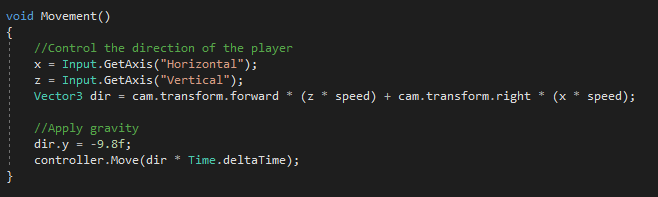
Since the player can not jump then the downwards velocity is constantly set to -9.8 units.
There is also another problem with the Character Controller component as the Gameobject can’t rotate on the x or z axis, meaning if you want the player to simulate changes in gravity’s direction or have realistic falling over e.g. the collider rotate with the player’s mesh and Gameobject, then this can not be achieved. However, this wouldn’t affect the this project as these mechanics aren’t.
As mentioned earlier, I was quite new to the Character Controller, so I had to do some research to understand how to use it. fortunately, the video below in fig2 was quite helpful explaining how the component works.
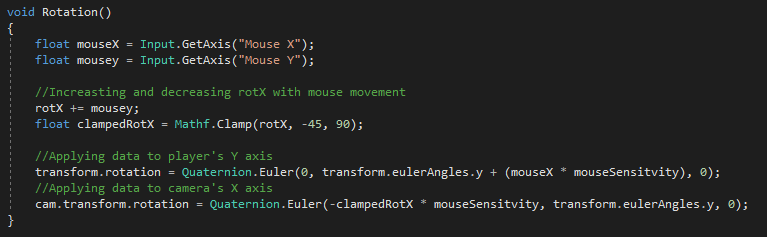
A challenge that I did have to overcome, was not from the movement side of the controller, but what to do with the mouse controls for the camera. Getting the player to rotate on the Y-axis with the mouse was fine, but trying to get the camera to rotate on its X-axis proved to be a challenge as I had to include limits to ensure the when looking upand down camera couldn’t be rotate into the body of the Gameobject. To make this work I used Mathf.Clamp to limit the rotation, however for unknown reasons when the camera reached the center of the screen it would instantly look down.
Eventually I simply added a variable that would increase or decrease by the the value given by the mouse’s y Axis. In this case the value was between 0.25 and 1 allowing for smooth rotation. I then used Mathf.Clamp to prevent the variable from going over 90 or under -45. A snipped of the code is shown below in fig3.
Conclusion
After using the Character Controller component for this project, I hope to use it more often for future projects. In addition, I could also spend an hour experimenting with manipulating the y axis of the player to simulate a jump and see how the Character Controller component works with root motion, allowing for more smooth and realistic movement and actions.
In addition, through out this week I will doing a game jam, which should give an opportunity to try out the mechanics mentioned above while also creating an enjoyable game in the process.
Bibliography
Character Controller – https://docs.unity3d.com/Manual/class-CharacterController.html
How to Move Characters in Unity 3D: Built-In Character Controller Explained [#1]
Figure List
Figure 1. Max Oates. ca. 2021. Example of character controller script [Digital image].
Figure 2. iHeartGameDev. ca. 2021. How to Move Characters in Unity 3D: Built-In Character [YouTube user-generated content]. Available at: https://www.youtube.com/watch?v=UUJMGQTT5ts&feature=emb_imp_woyt [accessed 27 September 2021]
Figure 3. Max Oates. ca. 2021. Example of camera rotation control script [Digital image].
 MaxMakesGamesBlog